If you accidentally deleted your unread mail folder in Outlook 2003 and 2007, you don't need to worry as its not the real folder. You can restore or recover the folder as… Keep reading
If you accidentally deleted your unread mail folder in Outlook 2003 and 2007, you don't need to worry as its not the real folder. You can restore or recover the folder as it a search context only. We can easily recover the folder and place it back it where you wanted by follow few steps provided below.

Restore or Recover the Deleted Unread Mail folder
On your Outlook:
Go to File point to New, then select Search Folder
A dialog box will pop up, point to Unread Mail then click OK

In your Mail Window Pane section you can now see Unread Mail Folder under Search Folders.
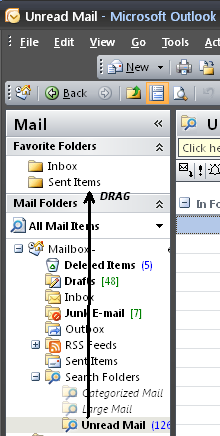
If you wish to put it on Favorite Folders you can just drag and drop the Unread mail folder to Favorite folder pane.
Comments